






Customers begin their working day and connect to their cloud-hosted applications. Orders are ready to process, customer records are within reach, and teams can get on with the work in front of them.
That is why continuity includes the route into the service, not only the server behind it. A working application has little immediate value to a person who cannot connect.
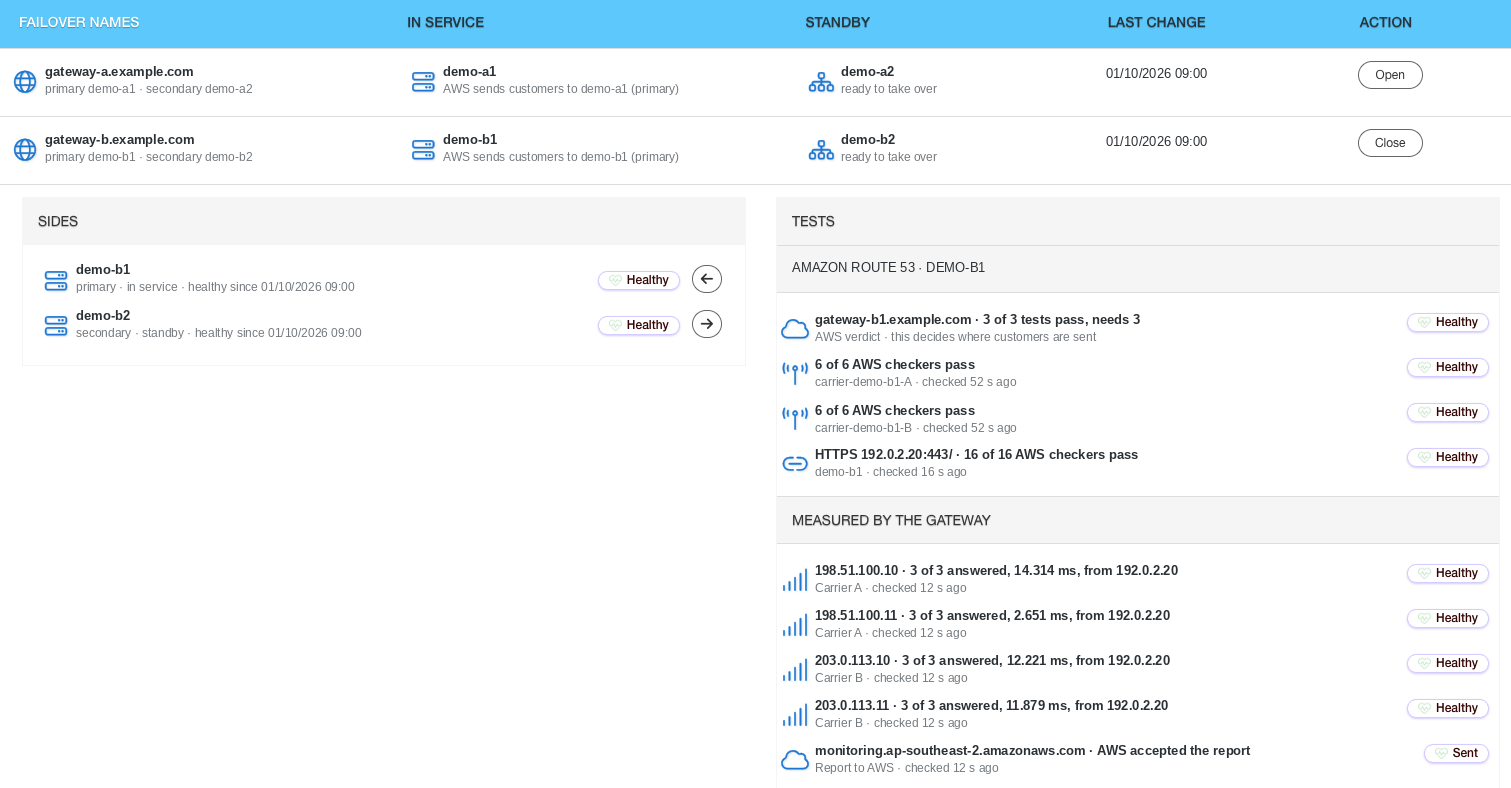
NetLeverage provides a standby gateway. A gateway is the route through which customers reach the service. If the active gateway fails, customers are sent to the standby automatically. Gateway Health shows which gateway is in use and whether the standby is ready.
Have an alternative before it is needed
Arranging an alternative after a failure begins is a different proposition from having one ready. People must first find the problem, decide what to change and coordinate the response while the business waits.
A standby provides an established alternative route. The service can direct customers to it when the active gateway fails, rather than starting the arrangement from scratch during the interruption.
For a partner, the explanation can be simple: if the usual gateway fails, the service directs customers to the standby. That says what the arrangement does without asking the business owner to learn the network design.
It is a defined response to a gateway failure. It should be explained in those terms, rather than turned into a promise that every kind of connection problem disappears.
Avoid relying on one carrier
A business owner may reasonably ask whether an apparent spare route still relies on the same underlying connection. The useful issue is how the service is arranged, not how many lines appear on a diagram.
The supplied NetLeverage service uses four independent networks and is not tied to one carrier. It also uses Amazon’s network for gateway load balancing, which directs connections across gateways.
For the customer, this provides an alternative to relying on a single carrier route. For the reseller, it is a concrete arrangement to explain when discussing access to the hosted service. There is no need to claim that one network is universally better than every other network.
Keep the discussion tied to the application the customer needs to reach and the response available when a gateway fails.
See whether the standby is ready
A continuity plan is easier to discuss when its current state is visible. Knowing that a standby was planned at some point is less useful than being able to see which gateway is serving customers and whether the alternative is ready.
Gateway Health provides that view. A partner can use it during a service review or when investigating an access problem, with the active and standby states in front of them.
For the business, this changes the conversation from a general assurance to an explanation supported by the service view. It gives the customer a clear question to ask and the partner a specific place to look.
Make the explanation useful to the people waiting
When access is interrupted, staff need a clear update. Explain what is known about the gateway, what the service is doing and what the team should check next. Avoid presenting an assumption as a confirmed cause.
The standby arrangement is part of the answer. The wider response still needs to reflect what is actually happening for the customer. A person unable to connect needs help with their situation, not only a reassuring description of the design.
Software vendors can explain the access arrangement behind their hosted applications. Resellers can show customers the active and standby states. Business owners can understand the continuity measure without becoming network specialists.
Ask us to show you the active gateway, its standby and how the service handles a gateway failure.