






Friday, 4:50 pm
A software vendor's support desk has a customer on the line. Payroll will not post. The support engineer knows what to do: get a copy of the customer's database onto a test server, reproduce the fault, fix it. That request can involve several handovers.
Somebody asks the hosting provider for a backup. The backup is tens of gigabytes. It is zipped, uploaded to a file-sharing site, downloaded again, unzipped, restored by a database administrator who has other things to do, and checked. If the customer's auditor needs the same database on their own server, the whole chain runs again, this time with a password sent by text message and a link that expires. The support investigation is left waiting.
The difficulty is the chain of manual handovers before anyone can investigate the problem.
The pain underneath
Every hand-over of a database has three problems. It needs a specialist at the receiving end. It passes through somebody else's storage on the way. And it does not scale: one engineer can shepherd one copy at a time, so a vendor with a hundred customers cannot help ten of them at once.
Behind it sits a bigger contradiction. Businesses have complex requirements: data in more than one place, a copy with the auditor, a copy with the support company, and evidence that each copy will actually restore. What they have to meet those requirements with is a chain of tools that each need an expert. The requirement is complex; the tool should not be.
The simple answer
A database in a NetLeverage Vault is already a database, in every generation you have kept. Two actions do the rest, and each one does the whole job on its own. Nobody at either end needs to be an expert.
Attach. Pick any version of a SQL Server database in your Vault and attach it to any SQL Server you have access to, on this computer or on your local network, with a single touch. No restore procedure, no file copying, no database administrator. The support engineer attaches last night's copy to the test server and is looking at the fault while the customer is still on the phone.
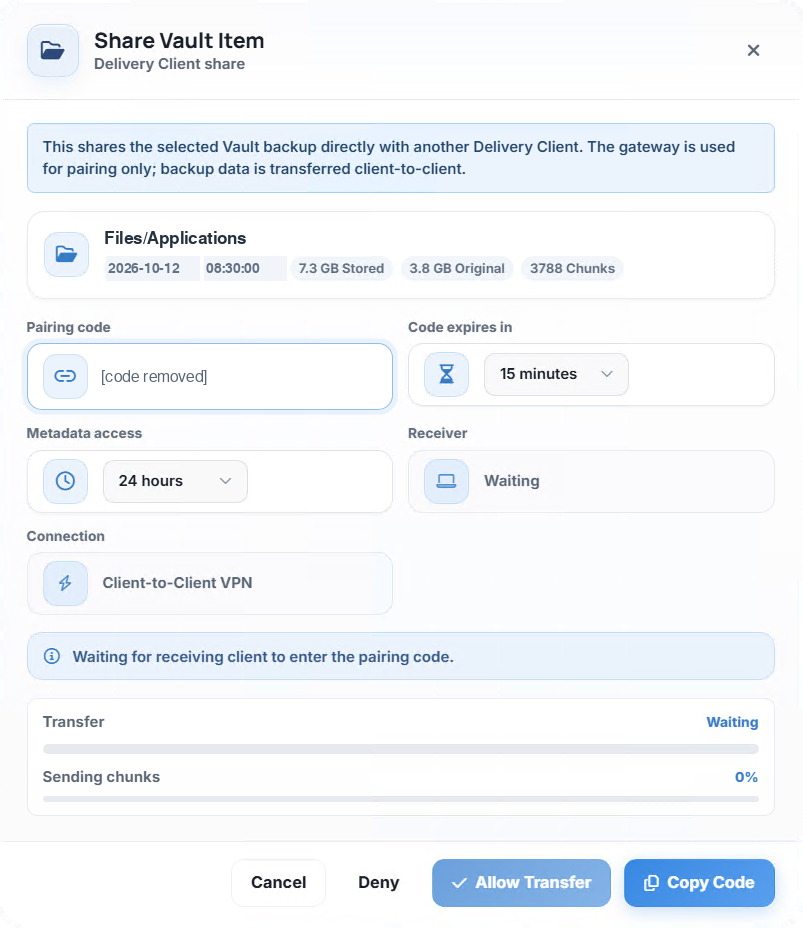
Share. When the person who needs the database is on another network, you share it from inside your Vault with one action that does everything: pairing, the secure connection, the transfer and the attach at the far end. You hand them a one-time code; they enter it in their own Delivery Client. The data then travels directly from your computer to theirs over an encrypted client-to-client connection. NetLeverage's gateway introduces the two ends and steps aside. The transfer does not use central storage as an intermediate stop.
The receiver chooses what to do with it. Take it into their own Vault to keep. Extract it as files on a remote server. Or attach it straight into a SQL Server you have never had access to, and never will: your customer's auditor can have your customer's database on the auditor's own server without you touching the auditor's network.
Your IT support company can be a receiver too. Share the copy they need for the job in hand, and they hold that copy, not hundreds of gigabytes of your storage and not a standing connection into your systems.
And Attach answers the question every backup owner should ask and few do: will this actually restore? Attach a generation to a SQL Server, open it, look at it. Opening the attached copy provides direct evidence that this generation can be used. You can do that for any generation, any week, as part of a planned recovery check.
Back to the support call
The engineer attaches the customer's database to the test server and finds the fault. The fix is confirmed against the customer's real data, not a guess. The customer's accountant, who needs the same database for the year-end, receives a code, enters it, and attaches it to her own SQL Server at her office. Nobody uploaded anything to a file-sharing site. Nobody waited for Monday.
You stay in control
Every share has a time limit you set, and a window within which the receiver can attach. The receiver only ever sees the item you shared, not your Vault. Nothing goes anywhere until you press Allow Transfer.
What it means for you
Software vendors. Support can investigate a customer’s problem using a copy of that customer’s data. Your customers get their database to their auditor or accountant without a request to you.
Partners. Moving a customer's database to a new server, a test environment or a specialist is a code and a click, not a project. Each handover can follow the same process.
Customers. Any version of your database, on any SQL Server you choose, when you choose. Proof that your backups restore, whenever you want it. And when someone outside the business needs it, you hand it to them directly, privately and on your terms.
Ask us to show you how to attach and share a saved database using the handovers your business needs.